cylc-admin
Releases, Versions and Branches
Versions & Branches
Semantic Versioning
Cylc projects use semantic versioning, e.g: for the version 8.1.2:
- 8 = major release (implies breaking changes)
- 1 = minor release (no breaking changes permitted unless forewarning provided)
- 2 = bugfix release (bugfixes and UI/UX issues only, no features or refactors)
Cylc projects are all pinned to the minor version of cylc-flow, e.g:
- cylc-uiserver 1.6.x goes with cylc-flow 8.4.x
- cylc-uiserver 1.7.x goes with cylc-flow 8.5.x
- cylc-rose 1.5.x goes with cylc-flow 8.4.x
- etc
This tight coupling prevents unintended combinations of Cylc components being installed into the same environment whilst allowing them to be installed in a modular fashion.
Bugfixes
When we make a minor release, we create a branch with a .x suffix for
subsequent bugfixes.
E.g. 8.1.x was for bugfixes to 8.1.0.
Raise any bugfixes against the relevant .x branch, a “sync” PR will be
automatically created after it is merged to pull these bugfixes onto the feature
branch.
Meta-Releases
The collection of components which are coupled to any given minor version of Cylc are collectively referred to as a “meta-release”.
For example, the 8.5 “meta-release” contains the following components:
- cylc-flow 8.5.x
- cylc-uiserver 1.7.x
- rose 2.5.x
- cylc-rose 1.6.x
Whereas the 8.6 “meta-release” contains:
- cylc-flow 8.6.0
- cylc-uiserver 1.8.x
- rose 2.6.x
- cylc-rose 1.7.x
(note the minor version numbers of components have been bumped by one between these meta-releases)
The meta-releases which are currently supported (i.e, which we continue to produce bugfix releases for); or under development (i.e, which we continue to develop features for) are documented on the status page.
Project Dependencies
There are dependencies between our projects, here’s a summary:
---
config:
    look: handDrawn
---
flowchart LR
    isodatetime --> rose
    isodatetime --> cylc-flow
    rose --> cylc-rose
    cylc-flow --> cylc-rose
    cylc-flow --> cylc-uiserver
    cylc-ui -->|bundled| cylc-uiserver
Continuous Integration (CI)
Our CI often needs to install dependent projects in order to run tests. For example, cylc-uiserver requires cylc-flow to be installed.
These prerequisites will be installed from the development branches, rather than using released versions.
This is done by the
install-cylc-components
action which uses the
meta-release data
(as displayed on the
status page)
to pick the development branch (e.g, master, 1.0.x, 1.1.x, etc) to
checkout.
Releases
Before making a release, review the components/versions you plan to release on the status page.
Major / Minor Releases
For major (e.g, Cylc 8.0.0, 9.0.0, etc) and minor releases (e.g, Cylc 8.1.0, 8.2.0, etc), please create a “release issue” in cylc-admin.
Fill in the information requested and follow the instructions in the issue.
Bugfix Releases
For bugfix releases, no release issue is required.
Making A Release
https://cylc.github.io/cylc-admin/status/status.html#branches
Create a new release by running the “Release stage 1” action. Provide this action with the version number of the release you would like to make, along with the release branch to use:
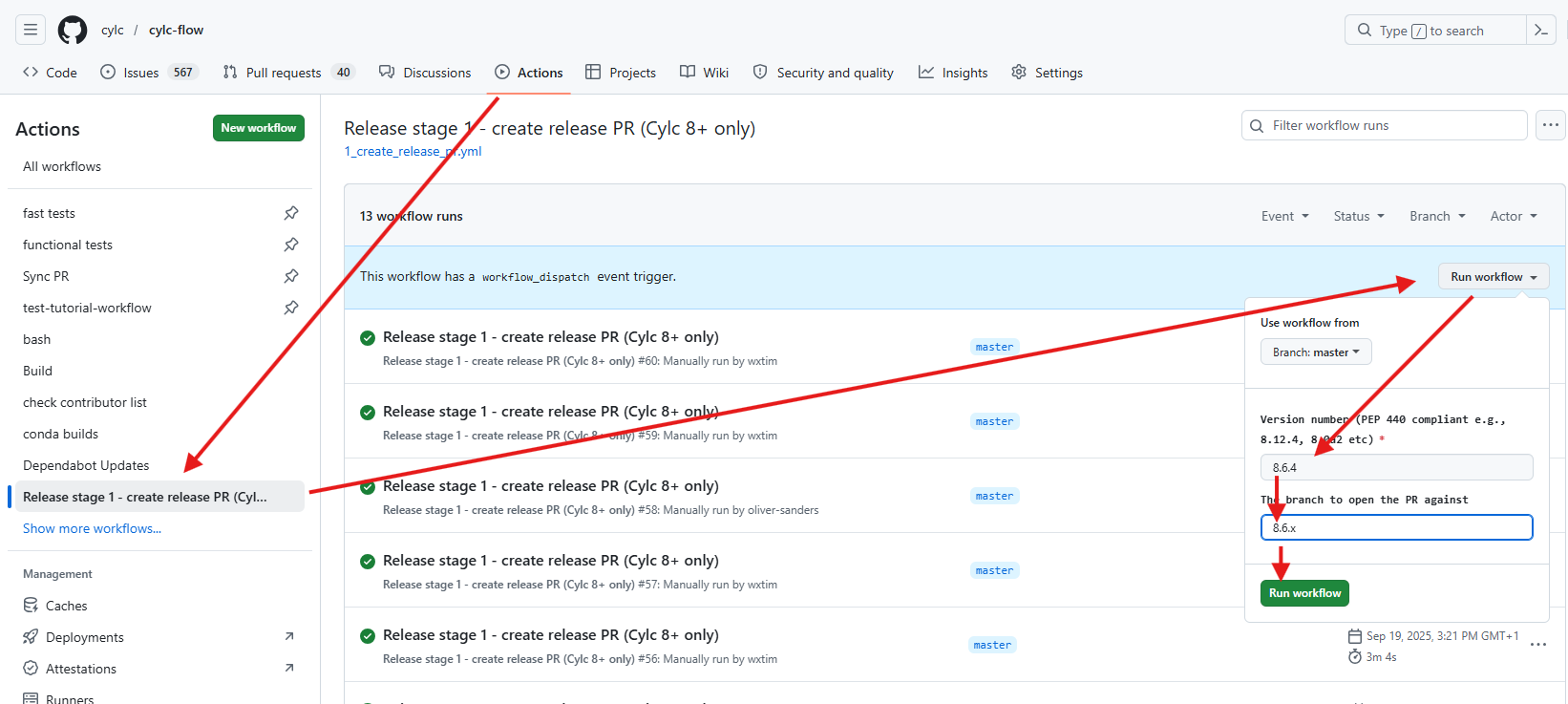
The action will run and create a release pull request:
- The version number should be set correctly.
- The changelog should be generated from any Towncrier fragments.
Follow the instructions on the PR, and request a review. The release will be made automatically when this pull request is merged.
Conda Forge Releases
Each package we release on Conda Forge has a corresponding “feedstock”
repository in https://github.com/conda-forge/<package>-feedstock, e.g
cylc-flow-feedstock.
Follow these instructions for creating/reviewing Conda Forge releases:
https://github.com/cylc/cylc-admin/blob/master/.github/ISSUE_TEMPLATE/new-release.md?plain=1#L131-L176
See also:
Documentation Releases
- cylc-doc: Release instructions.
- cylc-sphinx-extensions: Docs updated automatically when a new release is made.
- metomi-rose: Manual process - poke Oliver.